IntegrationsConnect every lead channel

Connect your AI chatbot to your lead channels

Answer website visitors, Instagram DMs, and Facebook Messenger chats from one AI sales assistant and one dashboard. WhatsApp Business, Shopify, HubSpot, Salesforce, and WooCommerce are coming soon.

  • One embed code
  • No coding required
  • Works on desktop and mobile
Available nowLive on every plan

Answer leads where they reach out

Connect the channels your prospects already use. Your AI assistant replies instantly, qualifies interest, and sends your team the leads worth following up.

Available now

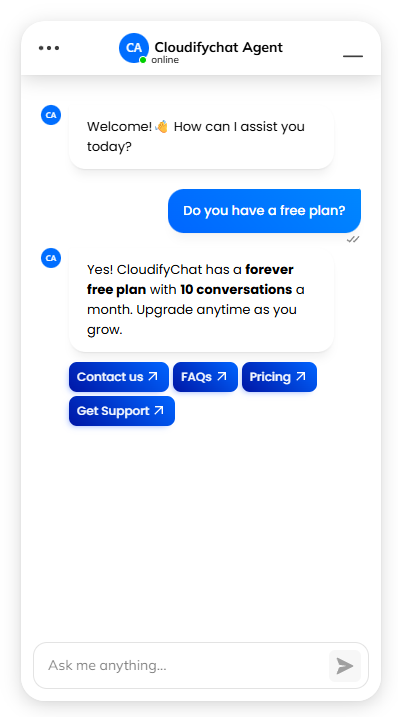
Website chat widget

Add a branded AI chat widget to any website with one embed code. It answers visitors, captures leads, and works on desktop, tablet, and mobile.

  • Install once by pasting a single script
  • Your name, avatar, welcome screen, and greetings
  • Request forms to capture lead details

Included on every plan
Available now

Instagram DMs

Reply to Instagram direct messages instantly, answer questions about your products or services, and qualify interested prospects 24/7.

  • Instant replies to new DMs, day or night
  • Separate buying intent from general questions
  • Answers from the same knowledge you trained

Included on every plan

Available now

Facebook Messenger

Connect your Facebook Page so your AI assistant replies to Messenger conversations automatically and qualifies leads around the clock.

  • Automatic replies to Page messages
  • Lead qualification around the clock
  • Every conversation in one dashboard

Included on every plan

  • Every conversation in one place

    Website, Instagram, and Messenger chats land in a single AI dashboard.

  • Lead activity and insights

    Review conversation history, lead activity, and performance insights.

  • Train once, answer everywhere

    Every connected channel answers from the knowledge you trained.

WebsiteLive in minutes

Add the AI chat widget to your website

Install once with a single script. No coding and no rebuild of your site. Your chatbot's knowledge is managed in the dashboard.

  1. 1

    Create a chat widget

    In your dashboard, open Integrations for your chatbot and create a chat widget linked to it.

  2. 2

    Make it yours

    Set the bot name, avatar, welcome screen, greetings, and request forms so the widget matches your brand.

  3. 3

    Choose its position

    Place the launcher on the left or right of the page and adjust the side and bottom spacing.

  4. 4

    Paste the embed code

    Copy the snippet from the Publish tab and paste it just before the closing </body> tag, or into your site's global footer or custom code area.

  5. 5

    Test and go live

    Check the widget on desktop and mobile, ask a few real questions, and publish.

Install on your websitePaste before </body>
<script src="https://bot.cloudifychat.com/embed.js"></script>
<script>
  window.onload = function () {
    window.initializeChatbot("YOUR_ID", "CONFIG");
  };
</script>

Copy your exact snippet from the Publish tab in your dashboard. It includes your chatbot ID and widget settings.

Works with your stack

  • Static HTML
  • WordPress
  • React
  • Next.js
  • Site builders with custom code
CustomizeYour brand, your rules

Make the chat widget feel native to your site

Tune how your assistant looks, greets visitors, and captures leads, all from the widget settings in your dashboard.

  • Name, description, and avatar

    Give your assistant a name and face that fit your brand.

  • Welcome screen

    Greet visitors with your own heading when the chat opens.

  • Quick links

    Add shortcuts to your most useful pages.

  • Greetings

    Add several greetings that rotate for new chats.

  • Forms and actions

    Set up a request form with your own button text.

  • Position and spacing

    Place the launcher left or right with custom spacing.

  • Session limits

    Optionally limit chat sessions per user.

RoadmapMore channels on the way

Coming soon: messaging, e-commerce, and CRM

We're adding integrations so your AI assistant can work across more of your sales stack.

  • Coming soon

    WhatsApp Business

    Respond to WhatsApp conversations and qualify new inquiries automatically.

  • Coming soon

    Shopify

    Answer incoming questions and turn store interest into qualified leads.

    Planned for all paid plans

  • Coming soon

    HubSpot

    Sync qualified leads and conversations directly into your CRM workflows.

    Planned for Growth and Pro

  • Coming soon

    Salesforce

    Connect chatbot conversations with enterprise-grade CRM automation.

    Planned for Growth and Pro

  • Coming soon

    WooCommerce

    Answer shopper questions and capture leads from your WooCommerce store.

    Planned for Growth and Pro

  • Need another integration?

    Tell us which tools your sales team uses and we'll let you know what's planned.

    Contact our team →

Integrations on every plan

Every plan includes the website widget, Instagram, and Messenger. Higher plans connect more integrations.

Compare all plan features →
  • Free$0/mo

    1 connected integration. Channels: Instagram, Messenger, and website widget.

  • Starter$22/mo

    2 connected integrations. Channels: Instagram, Messenger, and website widget.

  • Growth$63/mo

    Up to 5 connected integrations. All supported channels.

  • Pro$159/mo

    Unlimited integrations. All supported channels.

FAQIntegration questions

Integration questions, answered

Can't find what you need? Email sales@cloudifychat.com or contact our team.

Which channels does Cloudify Chat support?

You can connect a website chat widget, Instagram DMs, and Facebook Messenger today. WhatsApp Business, Shopify, HubSpot, Salesforce, and WooCommerce integrations are coming soon.

How do I add the AI chatbot to my website?

Create a chat widget in your dashboard, copy the embed code from the Publish tab, and paste it just before the closing </body> tag. You can also add it to your site's global footer or custom code area.

Read the step-by-step website guide →

Do I need a developer to install it?

No. If you can paste a snippet into your site's footer or custom code settings, you can install Cloudify Chat. No coding required.

Which website platforms does the widget work with?

It works on static HTML sites, WordPress, React and Next.js apps, and site builders that let you add custom code. Avoid rich-text fields that strip scripts.

Does the chat widget work on mobile?

Yes. The widget is fully responsive and works smoothly on desktop, tablet, and mobile devices.

Can I customize how the widget looks?

Yes. Set the bot name, description, and avatar, add a welcome screen, quick links, and greetings, create a request form, and place the launcher on the left or right with custom spacing.

Do I need to redeploy my site when I update my chatbot?

No. Your training data and chatbot content are managed in the dashboard, so updating what your assistant knows doesn't require a new website deploy.

How many integrations can I connect?

Free includes 1 connected integration, Starter includes 2, Growth includes up to 5, and Pro includes unlimited integrations.

Compare plans →

When will the upcoming integrations be available?

WhatsApp Business, Shopify, HubSpot, Salesforce, and WooCommerce are coming soon. Email sales@cloudifychat.com to ask about timing for the integration you need.